If you're running a law firm, your time is better spent on casework than copying dates out of emails. Calendaring court hearings is one of the most repetitive tasks in your practice and one of the easiest to automate.
The typical process looks like this: an email comes in, someone opens it, confirms the case, finds the date and Zoom link, creates the calendar event, then notifies the team and client. It feels quick - but multiplied across dozens of hearings a month, it adds up fast. Not to mention the possibility of missing the email completely.
Here's how to build an automated calendaring system using n8n and your CRM.
What tools do I need?
Here's what we're using in this walkthrough:
n8n — the automation platform that connects everything
Gmail (Outlook works just as well)
OpenAI / ChatGPT — to read and extract key details from emails
Google Calendar (or Outlook Calendar)
PipeDrive — as the CRM (Airtable, Google Sheets, Lawmatics, and others all work here)
Gmail for notifications — swap this for Slack, Teams, or WhatsApp if that's what your team uses
How does this automation work?
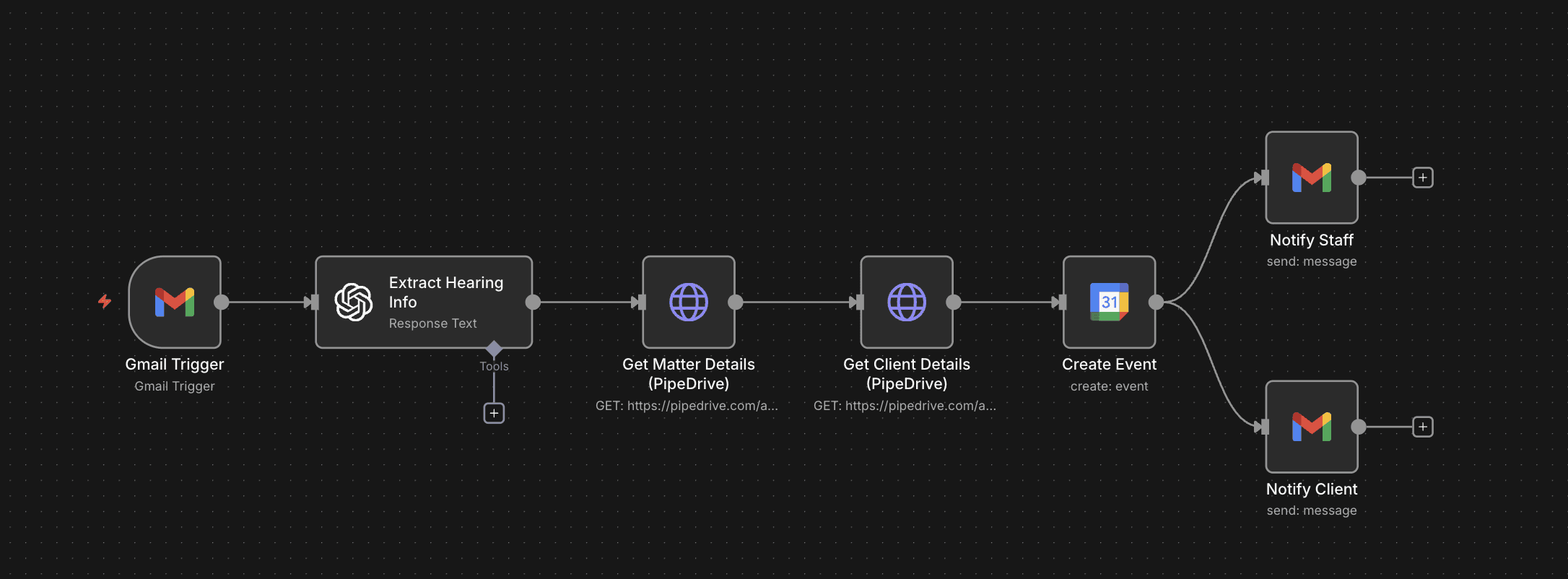
Here's an explanation of how each node in the screenshot works:
Gmail Node: This automation will monitor your inbox for any incoming court hearing emails. Refer to Google's syntax to filter emails based on sender, subject lines, and other information.
OpenAI Node: This extracts key information like cause number, hearing date/time, Webex/Zoom links, etc.)
PipeDrive Node #1: It checks PipeDrive (or your CRM) to pull in the related case information.
PipeDrive Node #2: It checks PipeDrive (or your CRM) to pull your client's details.
Google Calendar Node: It creates an event in your calendar with the relevant title, description, event location, and event time. It also automatically invites your client to the event.
Gmail Node (Staff): Your team gets an email letting them know the event has been created.
Gmail Node (Client): Your client receives a professional confirmation email. This is also a great opportunity to attach any documents they should have before the hearing.
Want to automate your calendar and client communications?
Book a call below and we'll help you set this up for free.