Every client call contains valuable information - promised next steps, urgent concerns, key case details. But when your team is focused on the conversation itself, things get missed. Notes are incomplete, summaries get written hours later from memory, and important follow-ups fall through the cracks.
This automation that automatically records, transcribes, and stores every call fixes all of that.
Why This Is Worth Setting Up
No More Manual Note-Taking: Your team can stay fully present during the call. The moment a call ends, a transcript and summary are generated and stored in your CRM automatically.
Automating Other Processes: The automation can detect action items and automatically kickstart workflows such as sending a booking link, generating engagement letters, or creating payment links.
Process Optimization: Once you've captured enough calls, you can analyze what questions clients keep asking, where handoffs break down, what information they're missing and use that to tighten up your processes.
How can I automate this?
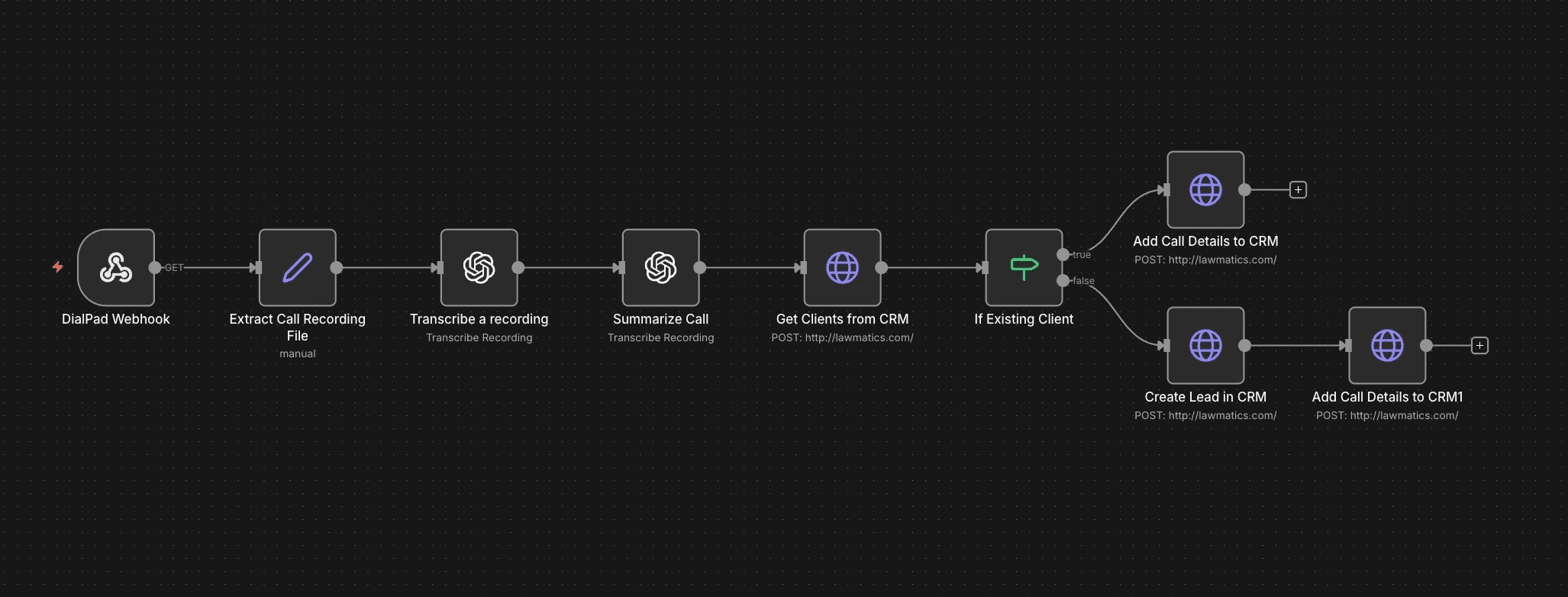
This n8n workflow makes sure every completed Dialpad call automatically becomes a clean CRM record - with a full transcript and summary tied to the right person.
It accomplishes two things:
Captures the call context instantly (transcript + summary), so nothing gets lost.
Routes it to the right record in your CRM - attaching it to an existing client record or creating a new lead if it's someone new.
What tools do I need?
Dialpad or Zoom (webhook trigger + call recordings)
n8n (workflow automation)
ChatGPT (transcription + summarization)
Your CRM (PipeDrive, Clio, HubSpot, Lawmatics, Monday.com, etc.)
How does this automation work?
DialPad Trigger Node: Dialpad fires a webhook the moment a call ends, triggering this workflow with the call metadata attached.
Extract Call Recording File: This step grabs the recording URL / recording file details to process downstream.
Transcribe a recording (ChatGPT): ChatGPT generates a full call transcript.
Summarize Call (ChatGPT): A clean summary is created capturing what the caller needed, key details, next steps promised, and urgency level.
Get Clients from CRM (Lookup by phone number): The caller's phone number is searched against your existing CRM records.
If Existing Client Node: Checks if the caller's phone number exists in your CRM.
Existing client: The transcript and summary are attached directly to their record.
New caller: A new lead is created first, then the transcript and summary are attached to that record.
Interested in this automation for your firm?
Book a call below and we'll help you set this up.